Building Production-Ready Go APIs on AWS Lambda with SST v3
A practical guide to Go on AWS Lambda with SST v3. Project layout, one HTTP API, arm64, and linked resources.
By Subash Adhikari · · 6 min read
Updated .
Go on AWS Lambda is a strong combination for an API. Go compiles to a single binary, warm requests are cheap, and SST v3 can build that binary for you.
I've been running Go Lambdas in production for over a year. These are the numbers from that workload:
| Runtime | Cold start | Warm latency | | --- | --- | --- | | Node.js 20 | 250ms | 15ms | | Python 3.12 | 180ms | 12ms | | Go (provided) | 120ms | 1-2ms |
The same request volume went from $45 a month on Node.js to $6 a month on Go. The rest of this post is the setup I'd start from today, using the go runtime that SST ships rather than a hand-rolled custom runtime.
What the go runtime actually does#
SST v3 supports Go as a first-class Lambda runtime. You set runtime: "go" and point handler at the directory that contains the Go module. That directory is the module path. It's not a file, and it's not file.handler like it is in Node. SST compiles it for you. You don't set provided.al2023 yourself and you don't name a bootstrap binary. That's the custom runtime path, and the go runtime is the one to use.
Two official examples are worth keeping open while you read this:
- API Gateway V2 with Go, which is the HTTP API below.
- A Go function with a linked bucket.
I don't publish a separate copy of this sample. Those two examples are the working source, and the function reference is where runtime, handler, architecture, and memory are defined.
sst dev runs the Go function live, so a code change doesn't have to wait for a full deploy.
Project layout#
The API example is a Node project for the infrastructure and a Go module for the function:
go-lambda-api/
  package.json
  sst.config.ts
  src/
    go.mod
    main.go
The SST example pins Go 1.23 (go 1.23.3 in its go.mod). Install the SST CLI the way the CLI docs describe, with brew install sst/tap/sst on macOS or curl -fsSL https://sst.dev/install | bash on Linux. The infrastructure file is TypeScript, so the project also needs the sst package:
mkdir go-lambda-api && cd go-lambda-api
npm install sst
Then write the two files below. sst init doesn't create the Go handler for you. The CLI uses whatever region your AWS credentials resolve to. I deploy this kind of API in ap-southeast-2.
One function behind an HTTP API#
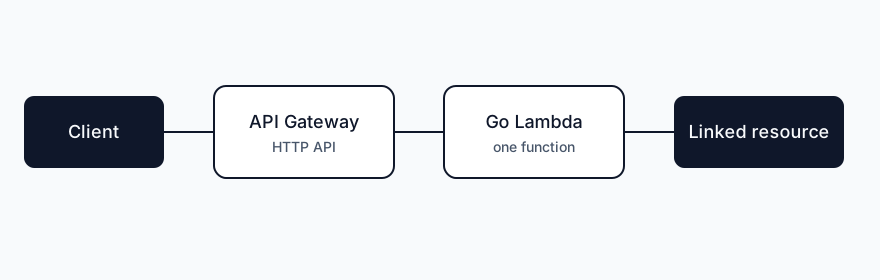
API Gateway gets slow and rate-limited when you create one Lambda per route. SST's own ApiGatewayV2 docs recommend a single function with routing in code, unless a route needs its own API Gateway feature. The $default route is the catch-all for that. API Gateway only invokes it when no more specific route matches. With only $default, every request hits the Go process and net/http decides what to do with it.
/// <reference path="./.sst/platform/config.d.ts" />

export default $config({
  app(input) {
    return {
      name: "go-lambda-api",
      removal: input?.stage === "production" ? "retain" : "remove",
      home: "aws",
    };
  },
  async run() {
    const api = new sst.aws.ApiGatewayV2("Api");

    api.route("$default", {
      handler: "src/",
      runtime: "go",
      architecture: "arm64",
      memory: "512 MB",
    });

    return { url: api.url };
  },
});
handler: "src/" matches the official example, where go.mod lives in src next to main.go. architecture defaults to x86_64, so set arm64 when you want Graviton. memory takes strings like "512 MB" and "1024 MB".
ApiGatewayV2 turns CORS on by default. Narrow it on the API instead of writing Access-Control-Allow-Origin: * in the handler:
const api = new sst.aws.ApiGatewayV2("Api", {
  cors: {
    allowMethods: ["GET", "POST"],
    allowOrigins: ["https://example.com"],
  },
});
The handler#
The example uses aws-lambda-go-api-proxy, so the Lambda speaks the API Gateway HTTP API format (payload v2) and your code is a normal http.ServeMux.
src/main.go:
package main

import (
	"bytes"
	"encoding/json"
	"net/http"

	"github.com/aws/aws-lambda-go/lambda"
	"github.com/awslabs/aws-lambda-go-api-proxy/httpadapter"
)

func writeJSON(w http.ResponseWriter, status int, payload any) {
	var body bytes.Buffer
	if err := json.NewEncoder(&body).Encode(payload); err != nil {
		http.Error(w, err.Error(), http.StatusInternalServerError)
		return
	}
	w.Header().Set("Content-Type", "application/json")
	w.WriteHeader(status)
	_, _ = w.Write(body.Bytes())
}

func router() *http.ServeMux {
	mux := http.NewServeMux()

	mux.HandleFunc("/hello", func(w http.ResponseWriter, r *http.Request) {
		writeJSON(w, http.StatusOK, map[string]string{"message": "hello world"})
	})

	mux.HandleFunc("/", func(w http.ResponseWriter, r *http.Request) {
		writeJSON(w, http.StatusNotFound, map[string]string{"message": "not found"})
	})

	return mux
}

func main() {
	lambda.Start(httpadapter.NewV2(router()).ProxyWithContext)
}
These module versions are the ones in the official example's go.mod (aws-lambda-go v1.47.0 and aws-lambda-go-api-proxy v0.16.2):
cd src
go mod init go-lambda-api
go get github.com/aws/aws-lambda-go@v1.47.0
go get github.com/awslabs/aws-lambda-go-api-proxy@v0.16.2
httpadapter.NewV2(...).ProxyWithContext is the v2 adapter. A REST API (API Gateway v1) would use the v1 adapter instead. This config creates an HTTP API, so it has to be v2.
Linked resources#
The Go SDK can read linked resource properties. It doesn't ship the service clients the JavaScript SDK has, so you still use the AWS Go SDK to call S3 or DynamoDB. Linking is how the function learns the resource name at runtime.
const bucket = new sst.aws.Bucket("Uploads");

api.route("$default", {
  handler: "src/",
  runtime: "go",
  link: [bucket],
  architecture: "arm64",
  memory: "512 MB",
});import (
"fmt"
"github.com/sst/sst/v3/sdk/golang/resource"
)
func bucketName() (string, error) {
value, err := resource.Get("Uploads", "name")
if err != nil {
return "", err
}
name, ok := value.(string)
if !ok {
return "", fmt.Errorf("Uploads name is %T", value)
}
return name, nil
}resource.Get("Uploads", "name") uses the component name from sst.config.ts. The same call with "App" and "name" or "stage" reads the current app. This is the pattern used in the Go function example and the SDK reference.
Run it#
From the project root:
npx sst dev
npx sst deploy --stage production
sst dev is the loop I actually use. Deploy once the live function behaves. The API URL is the url output returned from run().
A few things have bitten me, and the layout above is meant to avoid them:
handlermust be the module directory. A path like./functions/hello/main.gois not a Go handler in SST v3.- Keep
go.modnext tomain.goinside that directory. In a monorepo, the handler string also has to include the module name fromgo.mod, orgo buildwon't find the package. - Prefer one Lambda and a router. A function per path makes deploys slower for no gain on a small API.
- Check the JSON encode error. A handler that ignores it will return a 200 with an empty body, and you'll end up debugging the client.
Go on Lambda is worth it when the warm path is hot and your bill is driven by duration. SST's go runtime removes the part I used to do by hand, which was cross-compiling a bootstrap binary and wiring up a custom runtime. Start from the API Gateway example, keep the routing in Go, and link resources instead of hard-coding names.
Reflect
Your notes stay in this browser. Nothing you write here is sent anywhere.
This browser is not letting the page store anything, so notes will not be kept.
This browser is not letting the page store anything, so notes will not be kept.
This browser is not letting the page store anything, so notes will not be kept.
This browser is not letting the page store anything, so notes will not be kept.
Related posts
Thanks for reading. You can also follow along on X or with RSS.